Share It Forward · for speakers, small businesses and causes

Turn your fans into promoters.

Put one QR code on a slide, a flyer, a table sign or your phone screen. Anyone who scans it can tell their network about you on LinkedIn, X or Facebook in a couple of taps, with your words, your image and your link already in place.

  • LinkedIn
  • X
  • Facebook

That's a real code. Scan it with your phone to try the visitor side.

Where it works

One code for everywhere you meet people.

On stageLinkedIn

Your audience posts about your talk

You're presenting at an event with the code on your slides. Someone in the audience scans it and, a couple of taps later, has posted on LinkedIn about your talk, with a link to your website.
Word of mouthFacebook

Friends recommend you without the effort

A friend wants to tell people about you. Send them your code, printed or digital. It opens a ready-made Facebook post that recommends you and already includes the flyer you designed.

At your tableFacebook

Better than a business card

At a pop-up or market, someone asks for your card. Show them your code instead. They post about meeting you, what your cause is about and where to learn more, then get a one-tap invitation to follow you.

How it works

From your code to their feed in five taps.

You set it up once. Everyone who scans gets a post that's ready to go. This example is a talk at 1 Million Cups Dallas.

Share It Forward
Your campaign is ready
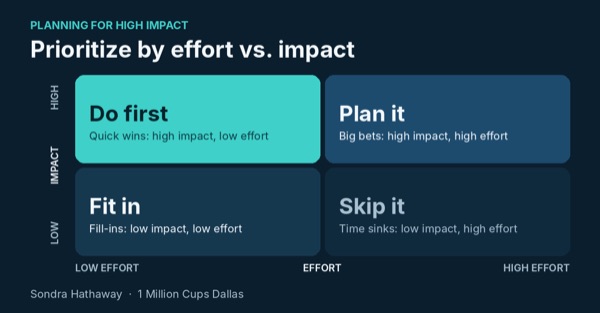
Post textSaw Sondra present at 1MC Dallas about how to prioritize by comparing effort with impact. Check it out. #1MC
Linksondrahathaway.com/hip
shareitforward.app/s/1mcdal
Download PNG
1 Million Cups Dallas
Learned something you want to share?
Tap a social media icon to post something like:
“Saw Sondra present at 1MC Dallas about how to prioritize by comparing the effort something takes with the impact it will have on my goals. Check it out.”
Thank you for coming. - Sondra Hathaway
1 Million Cups Dallas
Learned something you want to share?
✓Post text copied!

When the LinkedIn post window opens, simply press and hold in the post box, then tap Paste.

Saw Sondra present at 1MC Dallas about how to prioritize by comparing the effort something takes with the impact it will have on my goals…
Continue to LinkedIn
✕Post
Alex RiveraPost to Anyone
What do you want to talk about? Paste
✕Post
Alex RiveraPost to Anyone
Saw Sondra Hathaway present at 1MC Dallas about how to prioritize by comparing the effort something takes with the impact it will have on my goals. Check it out. #1MC
Planning for High Impactshareitforward.app
Step 1 of 5

Nothing to install

Visitors use the phone camera they already have. No app, no account, no sign-up form.

Shares first, then follows

After someone posts, they're thanked and invited to follow your page. Sharing always comes first, so nobody gets sidetracked before they post.

Your message, every time

Every post carries your wording, your image and your link, so your talk is shown the way you want it.

Ready before you speak

Set up a campaign in a few minutes, download the QR code as PNG or SVG, and put it on a slide, a flyer or a sign.

Ask for the share while they're still excited.

Right after a great talk, a good conversation or a visit to your table is when people most want to talk about you. Make sharing the easiest thing they do all day.

Apply for access

Share It Forward is by invitation for now. Apply in a minute and you'll get an invite link by email once you're approved. Already have an account? Sign in.